介绍
Microsoft PowerToys是一组实用程序,供高级用户调整和简化Windows体验,以提高工作效率。受Windows 95时代PowerToys项目的启发,此重启为高级用户提供了从Windows 10 shell压缩更高效率并针对单个工作流进行自定义的方法。
微软官方出了的一款系统增强功能,实测功能非常实用。值得下载。
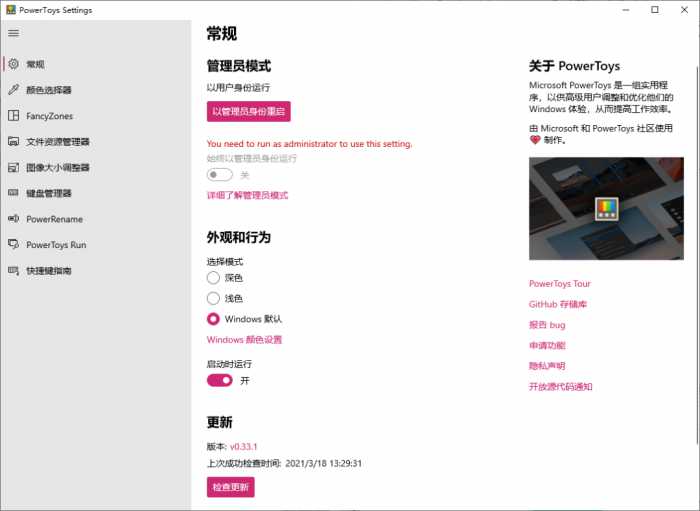
软件截图
软件特点
聚合搜索
更新日志
Highlights
CmdPal_Hero_final
New module: Command Palette ("CmdPal") - Created as the evolution of PowerToys Run with extensibility at the forefront, Command Palette is a quick launcher with a richer display and additional capabilities without sacrificing performance, allowing you to start anything with the shortcut Win+Alt+Space! Thanks @zadjii-msft, @niels9001, @joadoumie, @plante-msft, @ethanfangg and @krschau!
Enhanced the Color Picker by switching from WPF UI to .NET WPF, resulting in improved themes and visual consistency across different modes. Thanks @mantaionut! Thanks @Jay-o-Way and @niels9001 for helping with the review!
Added the ability to delete files directly from Peek, enhancing file management efficiency. Thanks @daverayment and thanks @htcfreek for the review!
Added support for variables in template filenames, enabling dynamic elements like date components and environment variables for enhanced customization in New+. Thanks @cgaarden!
Color Picker
Replaced WPF UI with .NET WPF for the Color Picker, enhancing compatibility and improving theme support. Thanks @mantaionut! Thanks @Jay-o-Way and @niels9001 for helping with the review!
Command Palette
Introduced the Windows Command Palette ("CmdPal"), the next iteration of PowerToys Run, designed with extensibility at its core. CmdPal includes features such as searching for installed apps, shell commands, files and WinGet package installation. This module aims to provide a more powerful and flexible launcher experience. Thanks @zadjii-msft, @niels9001, @joadoumie, @plante-msft, and the whole team!
FancyZones
Fixed a bug where deleting a layout resulted in incorrect data being written to the JSON file.
Fixed a bug where layout hotkeys were displayed incorrectly, ensuring the hotkey list does not include invalid entries.
Fixed an issue where the "None" option was missing in the editor layout.
Image Resizer
Fixed warnings in ImageResizer regarding the use of variables "shellItem" and "itemName" without being initialized.
Mouse Without Borders
Enhanced the logger to properly track the file path for easier debugging.
Refactored the "Common" class into distinct individual classes to enhance maintainability, and updated all references and unit tests to reflect these changes. Thanks @mikeclayton for this!
New+
Added support for variables in template filenames, including date/time components, parent folder name, and environment variables. Thanks @cgaarden!
Peek
Added the ability to delete the file currently being previewed in Peek, including navigation updates and handling for deleted items. Thanks @daverayment and thanks @htcfreek for your help reviewing this!
PowerToys Run
Fixed an issue where duplicated applications were shown by ensuring the shell link helper opens .ink files non-exclusively and correctly retrieves the "FullPath". Thanks @htcfreek and @davidegiacometti for review!
Fixed an issue where applying round corners on Windows 11 build 22000 caused crashes.
Async the OnRename method to unblock the thread. Thanks @davidegiacometti for review!
Added support for using sq instead of ^2 in the Unit Converter. Thanks @PesBandi!
Settings
Disabled the spell check feature in the text boxes of plugin settings for PowerToys Run. Thanks @htcfreek!
Fixed an issue where InfoBars for release notes errors were not displayed properly, and added a retry button. Thanks @davidegiacometti!
Workspaces
Fixed an issue where some minimized packaged apps (e.g., Microsoft ToDo, Settings) were not snapshotted.
Documentation
Added the FirefoxBookmark plugin to the list of Third-Party plugins for PowerToys Run. Thanks @8LWXpg!
Added the SVGL third-party plugin to PowerToys Run, enabling users to search, browse, and copy SVG logos. Thanks @SameerJS6!
Added Monaco usage for the Registry Preview.
Development
Updated WinGet configuration file location and extension. Thanks @mdanish-kh!
Removed the Markdown file bypass to ensure CI runs for commits that only update Markdown files.
Fixed an issue where the default generated file path exceeded the length limit of 260 characters for EnvironmentVariablesUILib.csproj, causing build failures.
Upgraded WindowsAppSDK to 1.6.250205002 and CsWinRT to 2.2.0. Thanks @htcfreek for review!
Upgraded XamlStyler to 3.2501.8 and dotnet-consolidate to 4.2.0. Thanks @davidegiacometti!
Updated .NET Packages from 9.0.2 to 9.0.3.
Optimized the UI Test Automation Framework and added UI test cases for the Hosts File Editor module.
Added fuzz testing for RegistryPreview.
Added new UI tests for the FancyZones editor, including tests for creating, duplicating, editing, and deleting layouts.
Added telemetry code to measure the module editor open time and evaluate the benefits of applying AOT.