介绍
PDF24 Creator是一款简单易用,功能独特的一款pdf文件制作工具,可以将其他格式的文件转换成PDF格式,再利用虚拟打印机打印出来!甚至可以将截图下来的图片,保存成为PDF文件!
PDF24 Creator 是一个免费的pdf转换器,使用它能够让你自己来创建pdf文档,任何支持打印的文档都可以变成pdf格式,整个软件带有中文界面,还能够设置转换后pdf文件的质量,尺寸,也能为pdf添加签名、水印,除此之外,还集成了好用的截图功能。
安装完毕以后你会在你的打印机里看到一个名为PDF24的虚拟打印机,这时打印需要转换成PD格式的文件时选虚拟打印机PDF24,也可以直接将文件以拖拉方式拉进这软件的主视窗编辑区里,它会自动转成pdf格式,它也支持抓取屏幕或图片直接转成pdf格式。
软件截图
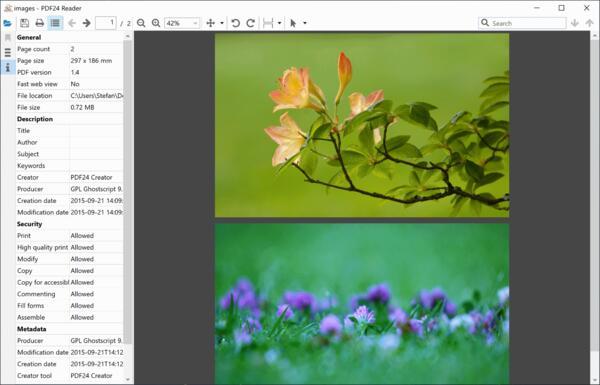
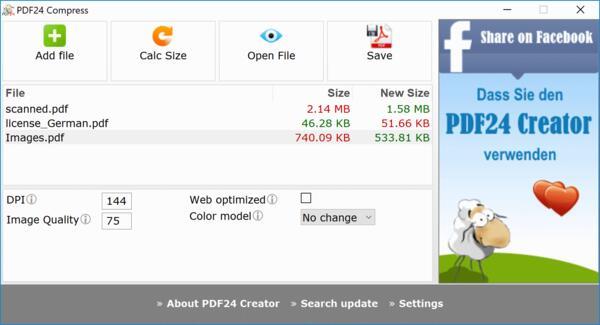
软件特点
1、如果是保存成pdf文档。
a、那么可以对其进行优化,使文档更加适合阅读或者更加适合打印。
b、为pdf文档添加作者、主题、关键词等信息、也可以给dpf添加密码。
c、设置分辨率,从而控制文档体积。
d、为pdf添加水印,你可以自由调节水印的内容、字体大小、颜色、位置。
e、添加签名。
2、保存成文档的话,将会有jpg、png、bmp、pcx、tiff等格式可供选择,你也能够调节分辨率、颜色数量和图片质量这些参数。
3、保存成psd文档。
PDF24 Creator还会在系统托盘中显示一个图标,在图标的右键菜单中,你会发现有截图功能,由于QQ截图还不能够直接把截图保存成pdf格式,所以你可以使用这个软件替代。
更新日志
Version 11.25.0
10.04.2025
PDF Reader: Bookmarks in reader now visible immediately
When opening a PDF with bookmarks, these were initially not visible. You had to switch to another panel in the sidebar and back again to display the bookmarks. The issue has been fixed, so bookmarks are now visible immediately upon opening.
E-Invoice: Relative path issue in e-invoice module fixed
An issue with relative paths during the conversion of PDFs to PDF/A using Ghostscript has been fixed. On some systems, an e-invoice could not be created, and an error was displayed. The conversion now works as intended again.
E-Invoice: Processing of JSON and PDF via Toolbox command line repaired
Using a JSON file and a PDF as input on the Toolbox command line no longer worked correctly; the PDF was ignored. The error has been fixed. The JSON file is now converted into an XML e-invoice and embedded in the specified PDF.
E-Invoice: Page numbers in e-invoices can be hidden again
Hiding page numbers didn’t work, regardless of the settings applied. This issue has been fixed, and page numbers can now be hidden as desired.
PDF Printer: Profile selection for automatic saving
In the settings for a PDF printer, under automatic saving or profile selection, you can now set a special value so that the user can choose a profile after printing on the PDF printer without having to define it permanently. This eliminates the need to create additional PDF printers with specific profiles assigned to them.
Output Profiles: Support for URLs in some values
In settings where a file must be selected (paper, overlay, attachments), URLs can now be specified. When URLs are used, the files are downloaded on demand. This fulfills the feature request: Use overlay or paper files from Microsoft SharePoint. A URL to a SharePoint can be entered here – a simple HTTPS call with a PDF file at the end.
DocTool: SVG-to-PDF function integrated
A new function for converting SVG to PDF has been added to DocTool. This allows the Creator, Converter in the Toolbox, and Shell tools to now also convert SVGs to PDFs.
Toolbox: SVG support in Images to PDF tool
SVG files can now also be selected in the Images to PDF conversion tool in the Toolbox to convert them into PDF format.
Toolbox: Improvements to Editing, Annotating, Signing, and Redacting Tools
In the tools for editing, annotating, redacting, and signing, the font selector now only displays font family names since these tools now also use the new SVG2PDF function. Text elements can include characters from various languages and symbols, which the new function can now handle. The bold and italic icons are visible again. Saving a file now uses the Job Monitor, displaying progress messages. Upon completion, the file can be saved, emailed, or used in other ways. A new icon in the toolbar allows switching between Full-Size Mode and Full-Width Mode.
Toolbox: File size limits removed
All file size limits have been completely removed, allowing larger files to be processed. However, this doesn’t mean every large file can be processed, as system resource issues may arise at some point. This would only apply to very large files.
Toolbox: Delayed opening of modal dialogs
Commands that open a modal dialog are no longer executed directly in the Webview2 event handler but are delayed. This is necessary because modal dialogs must not be opened directly in the Webview2 event handler. Attempting to do so could result in dialogs not always opening. Some users reported such issues, which should now be resolved with this new approach.
Toolbox: Translation of the spectrum color picker
The spectrum color picker has been translated. Affected tools: Editing, Annotating, Redacting.
General: Some components updated
Several components have also been updated, affecting various functions, especially in the Toolbox. These improvements benefit the respective tools.