介绍
ImHex 是一款开源的十六进制编辑器,专为逆向工程、数据分析和低级编程任务设计。它提供了强大的功能和灵活的配置选项,使得用户可以轻松查看、编辑和分析二进制文件。ImHex 的界面简洁直观,支持多种文件格式,并集成了高级功能如模式匹配、脚本编写和插件扩展,帮助用户更高效地处理复杂的二进制数据。无论是开发人员、安全研究人员还是爱好者,ImHex 都是一个不可或缺的工具,适用于需要深入理解文件结构和内容的场景。
软件截图
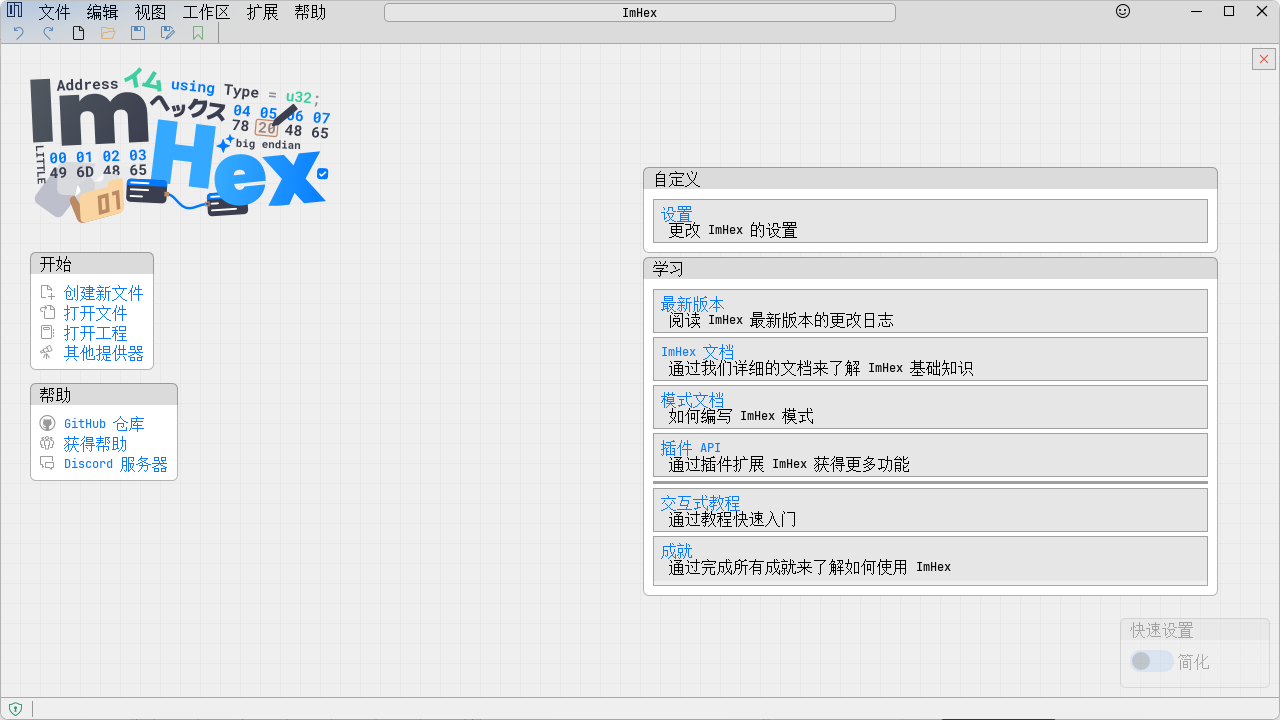
软件特点
高效的十六进制编辑:ImHex 提供了直观的界面和强大的编辑功能,用户可以直接查看和编辑文件的原始字节数据。支持大文件的快速加载和浏览,确保高效的编辑体验。
强大的模式匹配:通过定义YARA规则或正则表达式,用户可以搜索特定的二进制模式,查找和识别文件中的特定结构或签名。这一功能特别适用于逆向工程和安全分析。
灵活的脚本编写:支持使用Lua脚本语言编写自定义脚本,用户可以根据需要实现各种自动化任务。脚本可以用于解析复杂的数据结构、生成报告或执行批量修改操作,极大地提高了工作效率。
丰富的插件扩展:拥有丰富的插件生态系统,用户可以根据需求安装不同的插件来增强软件的功能。插件可以提供额外的解析器、可视化工具或其他实用功能,使得ImHex更加灵活和强大。
多文件格式支持:支持多种常见的文件格式,包括ELF、PE、Mach-O等可执行文件,以及常见的压缩和归档格式。用户可以直接在ImHex中打开和编辑这些文件,无需额外转换。
便捷的书签和注释:用户可以在文件中设置书签和添加注释,方便标记和记录重要的位置或发现。书签和注释可以帮助用户更好地组织和管理复杂的二进制数据,便于后续参考和分析。
多种导出选项:ImHex 提供了多种导出选项,用户可以将选定的二进制数据导出为文本文件、CSV文件或其他格式。这一功能特别适用于与其他工具或应用程序共享数据,或者生成详细的分析报告。
实时预览功能:对于某些文件类型,ImHex 可以提供实时预览功能,用户可以在编辑过程中立即看到更改的效果。例如,编辑图像文件时,用户可以实时查看图像的变化,确保编辑结果符合预期。
命令行接口:提供命令行接口,用户可以通过命令行执行各种操作,如打开文件、应用脚本或导出数据。这对于需要批量处理文件或集成到自动化工作流中的用户来说非常有用。
更新日志
v1.38.0
Features
- Added multiple new Data Sources
- A UDP Provider that can display UDP packets received on a specified port
- A SSH Provider that can connect to remote machines over SSH and read files from there using SSH or SFTP
- This is pretty cool as it allows live-inspection of the RAM of remote machines over the network by opening
/dev/mem
- This is pretty cool as it allows live-inspection of the RAM of remote machines over the network by opening
- Tons of improvements to the Pattern Editor. Huge thanks to @paxcut
- The pattern editor now supports semantic syntax highlighting for the PatternLanguage!
- Matching brackets are now highlighted when the cursor is next to one
- Patterns can now be opened in an external Editor and ImHex will update the pattern live when the file changes
- Parenthesis and quotes are now auto-closed when typing them
- Breakpoints in the pattern editor can now be toggled by clicking on the line numbers instead.
- Fixed various scrolling and scrollbar issues
- New and updated Languages!
- Added a French translation. Thanks a lot to @antigeky
- Added a Polish translation. Thanks a lot to @Shadow775711
- Added a Ukrainian translation. Thanks a lot to @RutarAndriy
- Updated the Simplified Chinese translation. Thanks to @only9464
- It's possible now to automatically chose the current system language with a fallback to English if the language is not available
- Added mutliple new data inspector rows
- Added a "Custom Encoding String" row, allowing quick decoding of selections using custom character encodings
- Added a fp24 (24-bit floating point) data inspector row
- Added a bfloat data inspector row
- Added a configurable fixed-point data inspector row
- Added a new Save Editor Mode and Simplified Pattern Editor
- Marking Patterns with
[[hex::editor_export]]will now make them show up in a new tab in the Pattern Data View- This allows for displaying only a limited number of fields in a simplified manner and letting you edit them
- Additionally, this allows you to create Game Save File Editors using ImHex's Pattern Language!
- By writing a pattern with these attributes, you can load the pattern using the new
imhex --save-editor <pattern_file>option to show only a simplified save editor UI - This can also be done using the Web Version of ImHex by appending
?save-editor=<gist_id>to the URL where<gist_id>is the ID of a GitHub Gist containing the pattern file
- By writing a pattern with these attributes, you can load the pattern using the new
- Marking Patterns with
- Added a "Go To" command to the command palette for quickly jumping to specific offsets
- Added new "Go To First/Last Element" buttons to the data inspector
- Added option to show extended/unprintable ASCII characters in the Hex Editor view
- Vastly improved the auto updater
- Added support for updating nightly builds
- Added support for switching between stable and nightly channels
- Added command palette option to open / focus a specific view
- Added option to skip over large chunks of bytes with the same value
- Added all tools to the command palette for quick access
- Added a Markdown renderer to ImHex
- The Changelog in the About page now uses this to render the changelog nicely
- Bookmark comments can now also use Markdown formatting
- Added a new File Information command line option that can show various information about a file without opening it
- This can be used by running
imhex --file-info <file_path> - If this file is supported by a pattern, it will also be loaded and additional information can be displayed
- This works by it calling the pattern's
get_data_descriptionfunction if it exists which may then return any markdown text to be displayed - This information will also be displayed in the Data Information view
- This works by it calling the pattern's
- This can be used by running
- Added a "Decode as Encoding" option to the right-click menu in the Hex Editor view for quickly decoding selected bytes using a specific character encoding
- It's now possible to jump to Yara matches in the Hex Editor by clicking on them
- Added a region sidebar list to the Intel Hex and Motorola SREC providers. Thanks to @sonorousfreq
- Added keyboard shortcuts to jump to next/previous difference in the Diff View. Thanks to @Zman350x
- There's now a interactive help button in the title bar that can be clicked to get information about specific elements in the UI
- Added a RGBA8 and RGB565 minimap visualizer
- Added option to the Minimap to shade cells based on the magnitude of the byte values
- Added a Copy and Edit option to the right click menu of patterns in the Pattern Data View
- Replaced the useless Constants View with a new Constants Search option in the Find View
- This lets you search for a predefined list of common constants such as CRC polynomials
- These can also be extended by simple constant json files
Improvements
- Startup times have been significantly improved
- On my machine, ImHex now starts up in ~60ms instead of taking multiple seconds
- ImHex now also uses significantly less RAM. Idle it uses around 60MB now instead of over 200MB before
- Pretty much everything has a nice new icon now
- ImHex now builds and runs on 32-bit Windows systems
- No official 32-bit builds will be provided, but you can build ImHex from source for 32-bit Windows now if needed using MSVC
- Decluttered and modernized many parts of the UI
- The main menu items now update automatically depending on what view is currently focused
- This makes it much easier to figure out which option affects what, especially for things like "Open" which can apply to multiple views
- Added Subpixel Font Antialiasing. Huge thanks to @paxcut
- This makes all text look significantly nicer, especially on lower resolution screens
- Fonts can now be more freely chosen using a new Font File picker that updates immediately
- Font names in the picker are now also shown in their respective font
- Frame Rate limiting is now much more precise and ImHex will wake up from sleep less often
- ImHex will now also not limit the frame rate as much if there's any animations playing to allow for a smoother feel
- Updated all dependencies to their latest versions
- The Import Pattern popup now shows up much quicker. Thanks to @shewitt-au
- Improved handling of cached providers such as the GDB provider to provide more up-to-date data and avoid hangs
- The GDB provider now works without the server supporting the NoAckMode
- This allows ImHex to be used for example to connect to a Nintendo Switch running Atmosphere
- Modernized the TTY Console view with a new layout and a nice diagram showing what the different options affect
- Instead of just minimizing the window when clicking the close button on macOS, it will now close the currently opened providers and only when clicked again on the welcome screen it will fully exit ImHex
- Individual plugins may now be disabled from the Plugins settings page
- ImHex now no longer uses the name "Providers" but instead uses "Data Sources" to better reflect what they do
- Most of the Hex Editor settings are now saved
- Included a launcher script with most builds that can be added to the PATH to easily launch ImHex from the command line
- Integer Literals may now be used in binary patterns. For example
12 34 ?? u32le(123) - Hashes are now being calculated in a background thread as to not freeze up the UI anymore
Bug Fixes
- Certain achievements now no longer trigger every time ImHex is started
- Fixed a crash when using the Edit -> Disassemble Selection option before the Disassembly view has been opened
- Undo now works for importing patterns in the pattern editor
- Fixed many crashes related to the pattern data view
- Things like sorting or filtering should now work much more reliably
- Fixed the
--reset-settingscommand line option not working - Fixed searching for negative numbers in the find view not working correctly
- Fixed some crashes on Wayland when exiting ImHex
- Empty Intel Hex and Motorola SRec files no longer appear as being one byte long
- Fixed issues when reordering toolbar items
- Fixed the Open File in Explorer option not working correctly on Windows
- Fixed Auto Backups not being properly created after the first time. Thanks to @paxcut
- If a crash happens in a background thread, ImHex is now able to properly handle the crash instead of just silently exiting
Artifacts
- Added new ARM64 builds for Windows and Linux
- Added new Snap packages for Linux
- Added new Flatpak packages for Linux
- Added a Fedora 43 rpm package
- Added a Ubuntu 24.04 deb package
Pattern Language
- Templates are now much better supported. Huge thanks to @AkiSakurai
- They can now be nested properly
- Their scoping now works much more sensibly
- If you used Templates before, you might need to adjust your patterns. The scope of parameters passed to templates is now that of the template instantiation, not where the variable is actually used. So it's no longer necessary to use
parent
- If you used Templates before, you might need to adjust your patterns. The scope of parameters passed to templates is now that of the template instantiation, not where the variable is actually used. So it's no longer necessary to use
sizeof(SomeType)now works when there's pointers involved- Many functions that previously only worked with the main section are now section-aware
- Conditionals now support short-circuit evaluation
- Fixed many fixes that caused crashes when errors happened in attributes
- Pattern post-processing finishes now much much quicker
- Parsing of floating point literals is now no longer locale dependent
- Fixed patterns passed to functions by references having their name changed unexpectedly
If you like my work, please consider supporting me on GitHub Sponsors, Patreon or PayPal. Thanks a lot!