介绍
Darktable 是一个非常全面的照片处理程序,可让您在数字暗房中编辑 RAW 图像文件。我们的想法是能够处理您的底片,并以非破坏性的方式轻松返回原始方式。该程序与 400 多种不同的相机型号兼容,让您可以通过无穷无尽的功能完整、专业地编辑您的照片。
在处理照片时,您可以从台式计算机或直接从您使用的相机导入它们。 Darktable 的伟大之处在于它提供了一个完整且可定制的导入系统。例如,它甚至可以让您将一系列照片变成延时摄影,以及其他选项。
软件截图
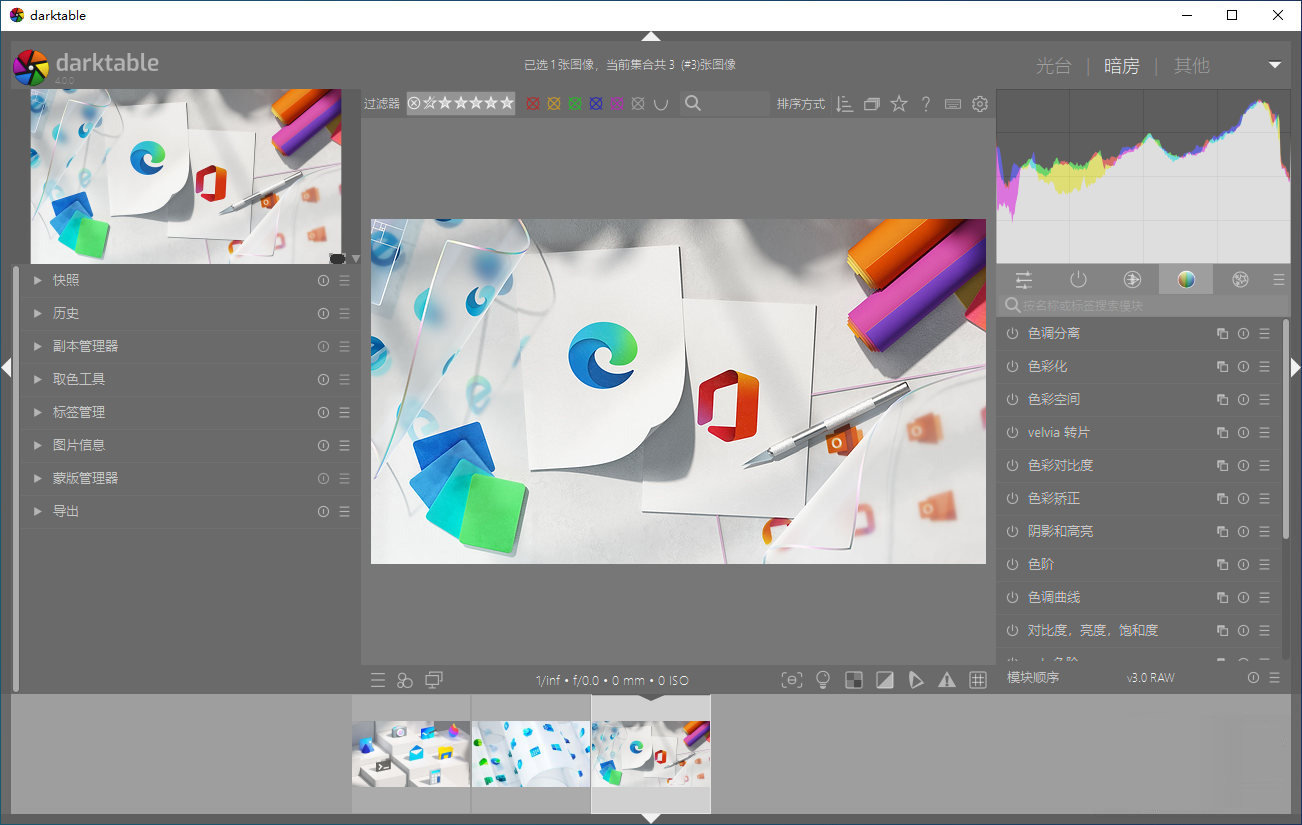
软件特点
- 在整个工作流程中进行无损编辑,您的原始图像永远不会被修改。
- 利用 raw 的真正力量:所有暗表核心功能都在 4×32 位浮点像素缓冲区上运行,启用 SSE 指令以提高速度。
- GPU 加速图像处理:由于 OpenCL 支持(运行时检测和启用),许多图像操作都快如闪电。
- 专业色彩管理:darktable 是完全色彩管理的,支持大多数系统上的自动显示配置文件检测,包括对 sRGB、Adobe RGB、XYZ 和线性 RGB 色彩空间的内置 ICC 配置文件支持。
- 跨平台:darktable 在 Linux、Mac OS X / macports、BSD、Windows 和 Solaris 11 / GNOME 上运行。
- 过滤和排序:按标签、图像评级(星)、颜色标签等搜索您的图像集合,对图像的所有元数据使用灵活的数据库查询。
- 图像格式:darktable 可以导入各种标准、原始和高动态范围的图像格式(例如 JPEG、CR2、NEF、HDR、PFM、RAF ……)。
- 零延迟、可缩放的用户界面:通过多级软件缓存,darktable 提供流畅的体验。
- 联机拍摄:支持某些相机品牌的带有实时取景的相机仪表。
- 支持的语言:darktable 目前提供 21 种翻译:阿尔巴尼亚语、加泰罗尼亚语、捷克语、丹麦语、荷兰语、法语、德语、希腊语、希伯来语、匈牙利语、意大利语、日语、波兰语、葡萄牙语(巴西和葡萄牙语)、俄语、斯洛伐克语、斯洛文尼亚语、西班牙语、瑞典语、乌克兰语、简体中文。
- 强大的导出系统支持 Piwigo 网络相册、磁盘存储、1:1 复制、电子邮件附件,并可生成简单的基于 html 的网络画廊。 darktable 允许您导出到低动态范围(JPEG、PNG、TIFF)、16 位(PPM、TIFF)或线性高动态范围(PFM、EXR)图像。
- 永远不要丢失您的图像开发设置 darktable 同时使用 XMP sidecar 文件及其快速数据库来保存元数据和处理设置。所有 Exif 数据都是使用 libexiv2 读写的。
- 自动化重复性任务:darktable 的许多方面都可以在 Lua 中编写脚本。
- Darktable 分为 5 个模块:Lighttable、Darkroom、Map、Slideshow 和 Tethering。这样做是为了方便地对功能进行分组。
- 一般来说,Darktable 和 Adobe Lightroom 的界面几乎相同,因此切换到 Darktable 时应该没有问题。
darktable 是由摄影师为摄影师创建的。
将同时也是狂热摄影师的开发人员作为目标受众的一部分,有助于了解现实世界的问题、挑战和工作流程。
darktable 是一个摄影工作流程应用程序和原始开发人员。供摄影师使用的虚拟灯台和暗室。它在数据库中管理您的数字底片,让您通过可缩放的灯台查看它们,并使您能够开发原始图像并增强它们。
darktable 在整个流程中以非破坏性方式编辑您的图像。您的原始图像永远不会被修改。专业的色彩管理功能可确保打印过程的保真度,GPU 加速处理意味着您可以使用显卡加快工作流程。
目前darktable包含61个图像操作模块。许多模块支持强大的混合运算符,提供混合功能,适用于输入图像信息和当前模块的输出,或与绘制的蒙版一起使用。
更新日志
The Big Ones
The following is a summary of the main features added to darktable
5.4. Please see the user manual for more details of the individual
changes (where available).
A new section Capture Sharpening is added into the demosaic
module. The capture sharpening tries to recover details lost due to
in-camera blurring, which can be caused by diffraction, the
anti-aliasing filter or other sources of Gaussian-type blur.
Added a new tone mapper implementation based on Blender's AgX
display transform. The new module's color output is similar to that
of Sigmoid, but the provided set of controls is more extensive. It
allows for setting exposure white and black points explicitly,
similar to Filmic RGB. The implementation includes a user-adjustable
pivot point for the tone curve, with the default set at 18%
mid-gray. Contrast around this pivot is adjustable. Controls are
provided to create a section of constant contrast, and independent
sliders are available to control the contrast in shadows and
highlights (the "toe" and "shoulder" of the curve). The resulting
output is characterized by a gradual color desaturation in
highlights, similar to film, and a natural-looking color
representation in mid-tones and highlights.
Added support for multiple workspace. When the corresponding option
is activated on the preferences, Darktable opens a dialog when
starting. From this dialog one can select the default workspace (the
one created the first time and currently used by everyone by
default) or to create a new one. Each workspace has it's own
database and configuration file (collection, last UI defaults...).
An in memory workspace can also be selected in the dialog. In this
case there is no database created in disk, a configuration file is
created though.
UI/UX Improvements
Many GNU/Linux distributions have dropped support for X11 leaving
only Wayland. Darktable has received many fixes to work properly on
Wayland including display ICC profiles. This version 5.4 should work
on Wayland as good as it was on X11.
Show a busy cursor when changing views. This provides immediate
feedback when, for example, double-clicking an image in the
lighttable instead of simply freezing the UI until the darkroom has
finished opening.
Added the standard "Window" menu to the application menu bar on
macOS.
In Tone Equalizer module move controls for mask exposure and
contrast compensation to the advanced tab.
In the navigation windows, the zoom dropdown is now better behaving. After a
free zoom over the darkroom, using the scroll over the zoom level
indicator of the navigation window, the selected zoom will be the
closest match (above or below depending on the scroll
direction). This is better than previous behavior where the zoom level
was always set to "small".
When moving around in a (zoomed) center view in the darkroom, we now
pre-calculate a slightly larger area so that it might not always be
necessary to immediately recalculate after further moves. The
initial 1px mouse move is generally not final, after all. This does
mean longer calculation times, so you can switch this off by setting
darkroom/ui/anticipate_move in darktablerc to 1.0. If you use cursor
keys to move around, you might want to increase it to >1.4 to
anticipate at least one further 20% move on either side. When the
recalculation is triggered by a module parameter change, say
exposure increase, only the exact area shown is calculated as
before, for optimal responsiveness.
When applying a rotation or flip, the transformation will be immediately
applied to the part of the image currently shown in the center view while
waiting for a full recalc. It used to be only repositioned but not rotated
which would lead to weird overlays for a brief period.
The popup (that you get when right-clicking) for sliders with a 360°
range now shows a color wheel or compass. If the slider is
soft-limited to a smaller range (for example in rotate&perspective)
you can toggle zooming out to the full range by
middle-clicking. Another middle click will restore the soft range
(and the normal fine-tuning mechanism).
When the slider range has been zoomed out beyond soft limits, the
now visible "extreme" areas have a slightly different color.
To make the rotation in the wheel match the rotation effect in the
image, most slider directions for angles have been reversed. You may
want to add a "-1" speed to any shortcuts you have gotten used to.
Added new default shortcut keys. These will take effect only if the
keys do not yet have user-defined assignments.
c - toggle crop box.
e - set exposure compensation (equivalent to
right-clicking on the exposure slider).
alt-r - set image rotation (equivalent to
right-clicking on the rotation slider).
alt-[ and alt- ] - fine rotation adjustment.
Different shapes for the indicator on sliders can now be selected in
preferences/misc/interface (triangle, circle, diamond, bar).
All toolbar buttons on the lighttable and darkroom have their
enabled state recovered across sessions. The visibility of the
enabled buttons has been improved to avoid confusions when
restarting Darktable and seeing artifacts due to some tools being
activate like Gamut check.
Make the cursor indicating the selected thumbs more visible. It is
now bigger and has a border to ensure better visibility on dark
thumbs.
Performance Improvements
Tune performance for the Lut3D module (5% to 20% speed-up).
Dramatically speed up first startup of a new installation when the
library is stored on a hard drive or NAS rather than SSD.
When zooming or panning the center view, transformations in the liquify
module are ignored. This leads to much improved responsiveness when
that module is active.
Other Changes
Allow using Shift modifier to select only the feather
points on blend masks. This is sometime needed when the path point
and the feather point are too close to each others.
Hierarchical presets are now supported for utility modules as well
as processing modules.
Dual demosaicing now works also in tiling mode for possibly better
OpenCL performance and smaller CPU memory pressure.
Added automatic compensation of camera's hidden underexposure for
Canon Lighting Optimizer mode, Nikon Active D-Lighting and HLG tone
modes, Olympus Gradation mode, Pentax Dynamic Range Expansion mode,
and Fujifilm DR200/DR400 modes. This affects both the "exposure" and
"denoise (profiled)" modules.
Add a RGB percent display in the color picker module.
Allow far smaller crop area to be created (crop up to 99% of the
image size).
Allow the variable $(ROLL.NAME) to have optional levels,
$(ROLL.NAME[n]), where 1 <= n <= 5, the levels follow the same
rules as film roll, the default value n=1, this keep the previous
behavior of $(ROLL.NAME).
Added optional collection of shortcut assignments using
keyboard+mouse combinations to control image processing
modules. Install these by clicking on the new "import extras" button
on the Shortcuts tab under Preferences.
Remove the "overwrite" option from the lighttable history stack
module. This option is used when pasting history to delete the
current history stack before pasting the new one. It is rarely used
and was confusing people when working copying/pasting on darkroom
from the filmstrip as this option was only visible on
lighttable. The option has been moved into the paste parts dialog.
Added manual chroma subsampling control for ...