介绍
Shotcut中文版是一个免费的开源跨平台视频编辑器。Shotcut中文版支持数百种音频、视频格式,以及编解码器,且无需导入,可直接编辑。Shotcut中文版还拥有流畅、直观的界面,帮助用户更好的编辑视频、音频。
软件截图
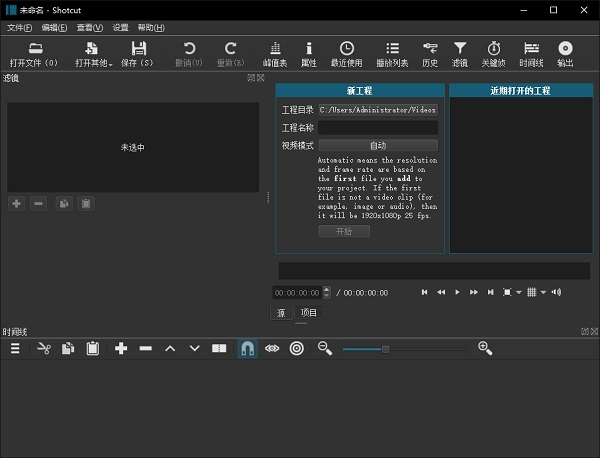
软件特点
宽格式支持
支持流行的图像格式,如BMP,GIF,JPEG,PNG,SVG,TGA,TIFF,WebP以及图像序列
音频功能
音频范围:响度,峰值表,波形,频谱分析仪,音量控制,立体声,单声道和5.1环绕声
视频效果
跨视频轨道的视频合成,HTML5(无音频和视频)作为视频源和过滤器,三向(阴影,中音,高光)色轮,用于色彩校正和分级,去隔行,自动旋转
编辑功能
使用纹波选项修剪源剪辑播放器或时间轴,易于使用的剪切,复制和粘贴操作,在时间线上追加,插入,覆盖,提升和涟漪删除编辑,三点编辑
跨平台和编解码器独立
跨平台支持:适用于Windows,Linux和macOS),独立于编解码器因此不依赖于系统编解码器,可以从外部驱动器作为便携式应用程序运行
显示和监控
通过NTSC监视器上的Blackmagic Decklink卡进行外部监控,额外系统显示/监视器上的外部监视,UI主题/皮肤:本机操作系统外观和自定义暗和亮
硬件支持
Blackmagic Design SDI和HDMI用于输入和预览监控,用于慢进/快速控制的Leap Motion
更新日志
Higher Bit Depth: 10-bit Video CPU Pipeline
What is "bit depth?" That is the number of colors or video brightness levels. 8-bit has only 256 values per color component, for example, red/green/blue. 10 bits has 1024 levels. Previously, 10-bit video sources were only partially supported using GPU Effects and only GPU filters. Without GPU Effects (CPU), in order to stay in thee 10 bit space, you could only use filters with the #10bit tag but no transitions or track blending/compositing. Now, we have ported many CPU video effects to support 10- and 12-bit video sources including transitions and track blending. Also, the #10bit CPU video filters also work properly with the experimental GPU processing. Not all of the video CPU filters have been converted; many of them come through another software project that does not support it. However, we were able to convert many for this release or at least mark them as safe for a 10-bit project.
Higher Image Quality: Linear Color Processing
Any mixing of pixels with a color space's gamma is not ideal, can cause color distortions, and is technically incorrect. This pixel mixing occurs whenever images interpolated, for example scaling, blurring, and sub-pixel positioning, as well as with track blending/composition. Previously, only GPU Effects and video filters in the GPU category operated in linear color. Now, there is an option to use it outside of the GPU processing. But when using the GPU, the handoff of the video from GPU to CPU now stays in the linear color transfer.
There is a new sub-menu in Settings > Processing Mode with options:
Native 8-bit CPU (fast, flexible)
Native 10-bit CPU (slower, better)
Linear 10-bit CPU (slowest, best)
Linear 10-bit GPU/CPU (Experimental)
Non-linear "native" options are still included because there is a signficant performance decrease when using linear (more conversions). We have a plan to improve performance for the next release. 8-bit is still included because it is more "flexible" by including more video filters. Of course, you can use an 8-bit video filter in a 10-bit, but the quality of the video clip or track will suffer a reduction in bit depth.
Other New Features
Added a drop-down to the Filters menu's Video button to more conveniently browse appropriate filters for the current processing mode:
GPU
10-bit
Color
RGBA
YUV
Changed the Filters menu to default to Color filters in the Color layout/workspace and Audio filters in the Audio layout.
Added a visual preset browser for New > Image/Video from HTML generator.
To add a thumbnail for your custom preset add a file named <preset-name>.webp in the preset folder.
Added Minimize Shotcut and Record Audio to Screen Snapshot and Screen Recording.
Added support for nvenc to Screen Recording on Linux/X11.
Added support for mov_text and SSA in Properties > Extract Subtitles.
Changes
Changed the default for Settings > Timeline > Automatically Add Tracks to OFF (changed in v25.10).
Changed the preset folder for the HTML generator to presets/HTML.
Changed the VP8/9 WebM presets to offer greater control over quality and bitrate.
Changed New > Animation (Glaxnimate) to Drawing/Animation to clarify that this is not only for animation.
Changed New Project > Project name to not permit ? to fix unloadable project.
Changed the Opacity video filter's maximum to 200% to support reducing translucency.
Improved VA-API hardware encoder compatibility on our Linux AppImage, Portable, and Snap builds.
Changed Screen Snapshot on macOS to show a toolbar to choose rectangle or fullscreen and whether to minimize.
Removed Screen Recording on Windows 10--Snipping Tool does not support it.
Upgrade zimg (used to convert HDR to SDR and to and from linear color) to version 3.0.6.
Fixes
Fixed dissolve transition damages color (broke in v25.10).
Fixed export on Windows not working with some special characters in a filename (broke in v25.10).
Fixed Settings > Player > External Monitor > DeckLink Gamma > HLG HDR (broke in v25.10).
Fixed Stereo Enhancer and Declick Audio filters (broke in v25.10).
Fixed alpha channel is lost from a nested XML clip (broke in v25.10).
Fixed 10-bit with amf (AMD) and mf (Windows on Arm) hardware encoders.
Fixed Text: Typewriter cannot reduce blink rate to 0.
Fixed the defaults when using New > Text > Typewriter.
Fixed window not properly restored to maximized for Screen Snapshot.
Fixed the selection rectangle was showing when using Screen Snapshot on Linux/X11.
Fixed the UI for the Downmix audio filter (broke in v25.05).
Fixed custom colors in color dialogs are not saved in Qt 6.9 and up.
Fixed clips are still replaced after stopping a Reverse or Convert job.
Fixed Freeze Frame is not properly adjusting the start and end of existing filters.
Fixed Toggle Keyframe at Playhead for Corner Pin video filter.
Fixed Chroma Key: Simple overwrites the alpha channel including padding for a mismatched aspect ratio.
Fixed crash on MLT XML with extremely large (>8K) resolution (CVE-2025-65834).
Fixed audio crackle artifacts with pcm_s24le in mkv.
Fixed duration of markers are off by 1 frame in different ways and places.
Fixed the appearance of toolbars under KDE/Linux when its Settings > Colors & Themes > Application Style > Configure Icons and Toolbars > Main toolbar label is Beside icons.
Fixed a memory leak generating audio waveform data on media with an invalid or exremely long duration.
Fixed dragging media with a very long duration (> 1 day) to Timeline uses a lot of memory and unresponsive.
Fixed crash when clicking Cancel in the Set Duration dialog (also related to very long or invalid duration).
Fixed a memory leak in Filters panel.
Fixed a possible crash in the player's scrub bar.
Fixed the vertical position of the shadow-clip when dragging a clip to a timeline with a subtitles track.