介绍
官方网站:https://vladelaina.github.io/Catime/
一款简洁的 Windows 倒计时工具,支持番茄时钟功能,具有透明界面和丰富的自定义选项。
软件截图
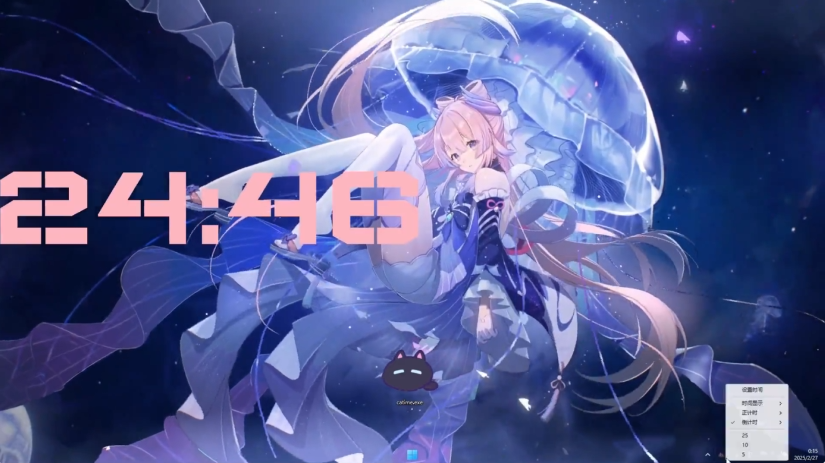
软件特点
- 极简设计: 透明界面、点击穿透、可调大小和位置、多语言支持
- 丰富字体: 47种字体,支持实时预览
- 灵活计时: 快速预设、自定义时间输入、显示当前时间(12/24小时制)、倒计时、正计时
- 超时动作: 通知、锁屏、关机/重启、打开文件
- 界面美化: 15种预设颜色、支持输入颜色值、使用调色板选择、支持实时预览
使用说明
- 左键点击托盘图标: 设置时间
- 右键点击托盘图标: 打开设置菜单
- 编辑模式(Edit Mode): 拖拽调整位置,滚轮调整大小,🖱️鼠标右键关闭编辑模式
更新日志
v1.4.0
- Comprehensive systematic refactoring of over 3/4 of the code.
- Switched to 32-bit compilation.
- Completely eliminated font aliasing (jagged edges) issues.
- Fixed the issue where fonts appeared white in Edit Mode; restored the original colors.
- New Features
- Added "Style" option.
- Added "Plugins" option — this might be the best update in Catime's history.
- Tray icon now supports displaying:
- Current Battery Level
- Caps Lock Status
- Colors now support gradients and flowing colors.
- Optimized the notification method for the Pomodoro countdown.
- The timeout dialog box supports free movement and resizing.
- Added support for system fonts - Credit: 溜溜大神校长来了
- [Tray Animation] Added "Original Speed" option
- Added "Pomodoro Timer" to startup presets
- Fixed the issue where color values could not be saved
- Fixed animation issues with millisecond display
- Edit Mode supports moving position using arrow keys
- Added "Show Milliseconds" to hotkeys - Credit: 溜溜大神校长来了
- Fixed the issue where the icon was reset to default upon every restart
- Time can be displayed on the taskbar (no longer covered/obscured)
- Fixed the issue where the font stopped working after modifying countdown presets
- Fixed the issue where font folders were not recognized for some Chinese usernames
- Optimized the sorting logic for fonts and tray icons.
- Automatically display current time for preview when Edit Mode content is empty.
- Adjusted the default startup behavior to display the current time.
- Added "Reset Position" option.
- Fixed the issue where the timeout action was accidentally modified after switching to Pomodoro Timer
- Fixed the issue where the tray animation unexpectedly turned into the Logo after waking from sleep
- Optimized runtime memory usage; only necessary content is loaded to minimize performance overhead.
- Support scrolling the mouse wheel on the tray icon to adjust opacity.
- Added automatic configuration file migration (due to this refactoring, it will be enabled in the next version).